# Agent Approval Log
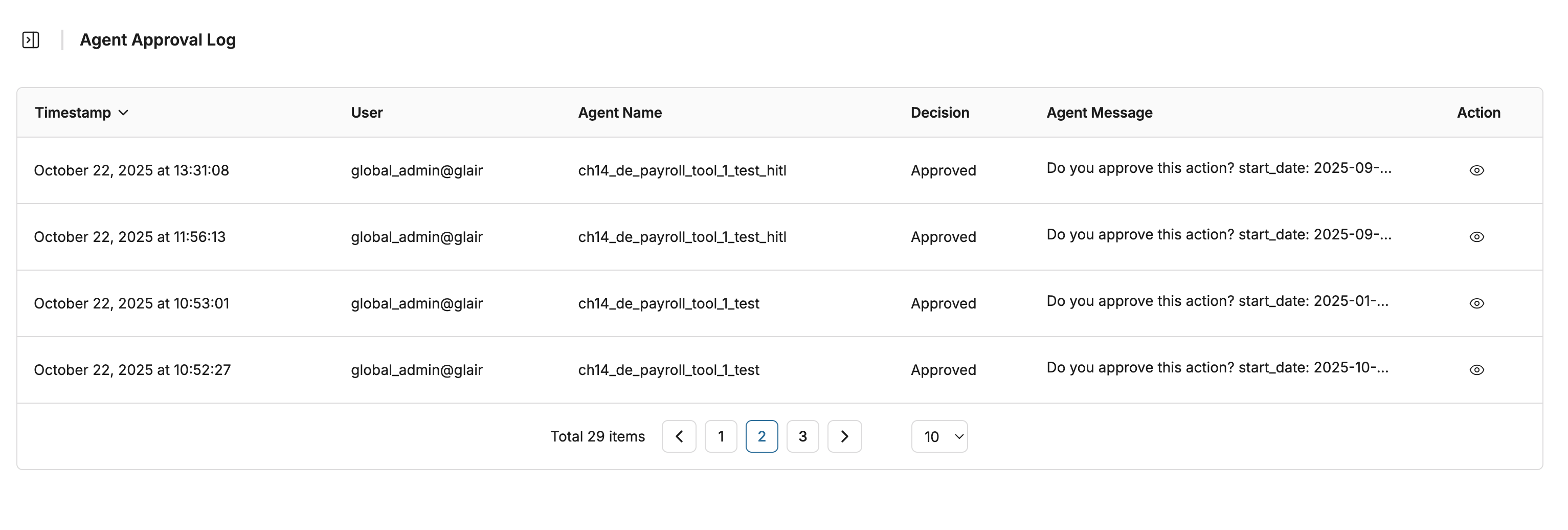
The **Agent Approval Log** records all approval activities performed through the **Human-in-the-Loop (HITL)** process. It provides a complete audit trail for monitoring, compliance, and accountability of manual review actions on agent responses.
## Agent Approval Log
This log specifically captures **Agent Approval** actions, including:
* **Approve** – The user validates or accepts an AI-generated response.
* **Reject** – The user disapproves or flags an AI-generated response.
* **Skip** – The user skips the review process for a particular item.
* **Timeout** – The system marks the action as timed out when no response is received within the defined duration.
#### Access Steps
To view the Agent Approval Logs, open the **Admin Dashboard** and navigate to **Audit Log → Agent Approval Log**.
You can sort the records by **time** to view the most recent actions. Click the **View (eye icon)** in the **Action** column to see detailed information about a specific record.
The field consist of
1. **Request ID:** Unique identifier automatically generated for each approval request.
2. **Agent Name:** The name of the agent that initiated the request.
3. **Tool Name:** The tool used by the agent when the request was triggered.
4. **User:** The email address of the user who performed the approval action.
5. **Decision:** Indicates the result of the approval request (Approved, Rejected, Skipped, or Timeout).
6. **Agent Message**: The confirmation message displayed during the approval process.
7. **Arguments:** Displays the JSON payload containing detailed parameters or data passed during the request (e.g., message body, subject, recipients, and metadata).